AI Creative Engine · Built In-House · Live

Creative.
Automated.
At Scale.

One proprietary engine, two weapons: on-brand image ads generated from a library of proven winning formats, and catalog enrichment that turns every product in your Meta feed into designed ad creative — kept in sync with your store, daily, automatically.

45+
Winning Templates
1000s
Of SKUs Per Run
Daily
Automatic Feed Sync
0
Manual Design Hours
Image Ad Generation · Catalog Enrichment · Growth by Design · Automated at Scale · Image Ad Generation · Catalog Enrichment · Growth by Design · Automated at Scale ·

Creative Is The Targeting Now

The creative bottleneck

In the Andromeda era, Meta's algorithm targets with your creative, not your audience settings. The accounts that win feed the machine more concepts, more formats, more iterations. Traditional creative pipelines — brief, design, review, export — take weeks. Your competitors' algorithms are learning while yours is waiting on a designer.

Volume × quality × speed = delivery

The catalog blind spot

Catalog ads are often the largest spend surface in an ecommerce account — and the least designed. A bare packshot on a white square, straight from the store feed, competing in the same auction as fully designed creative. Every impression your catalog serves undressed is money left on the table.

Your biggest ad surface. Zero design. Until now.

Image Ad
Generation

From brief to launch-ready creative in hours. Our engine designs and assembles on-brand image ads from a library of formats distilled from real winning ads — then stages them directly into Meta, paused and ready for your sign-off.

🧬

Winning-Format Template Library

45+ ad layouts reverse-engineered from proven performers — testimonial, offer, education, comparison, UGC and more — each scored and matched to the angle it converts best on.

🎨

Brand Packs, Not Brand Drift

Your palette, fonts, logo, product cutouts, real reviews and press quotes are encoded once — every ad renders inside your brand system, never off-grid.

Batch Generation & Review Flow

Dozens of variants per run, reviewed in a visual gallery with keep/cut decisions and a live editor for final polish. Only approved creative ships.

🚀

Straight Into Meta

Approved ads upload directly to your account as paused staging ads — feed and story formats paired automatically. Activation stays a human decision.


Raw Photo
Raw photograph of a Yacht Week float-party raft-up in Croatia
One Brief
Generated Ad · country-pill
Finished Yacht Week Croatia early access ad, generated by the GMB creative engine
Raw Photo
Raw photograph of two Yacht Week guests looking out over the coastline in Sicily
One Brief
Generated Ad · logo-stack
Finished Yacht Week 2027 early bird waitlist ad, generated by the GMB creative engine

Real output. Yacht Week 2027 Early Bird waitlist campaign. Raw photography in, launch-ready ads out. Generated and staged into Meta the same day, zero design hours.
Brief To Live In Five Steps

01

Brief In, Gallery Out

You give us the angle, the offer and the images. The engine writes the concepts, renders the full set across proven layouts and opens them in a visual review gallery. Typically inside the hour, not the fortnight.

02

One Link For Approval

The set goes to your client on a single branded review link. Every ad with its copy, its call to action and its placements. No logins to chase, no PDF round-trips, no arguing about which version is current.

03

They Respond However They Work

This is the part that usually breaks. So we made it three-ways flexible, and all three land in the same place.

Tweak It Drag, resize and retype directly on the ad in the browser. No software, no design skills.
Just Say It Write feedback in plain English. "Make the subheadline bigger." We action it at the template level.
Hand It Off Send it to their own designer with the file and the notes attached. Nothing gets lost in a thread.
04

Select And Approve

Approve or reject ad by ad. Decisions and edits sync straight back to us, revisions re-render in place, and everyone is always looking at the same current set. The approved list is the shipping list.

05

Straight Into Meta

Your media buyer pushes the approved set directly into the ad account, paused and ready, with feed and story formats paired automatically. Going live stays a human decision.

What this replaces: the version-controlled folder, the marked-up PDF, the "can you just make the logo bigger" email thread and the two-week wait between brief and launch. A recent run went from brief to eleven client-reviewed ads, with feedback actioned, inside a single afternoon.

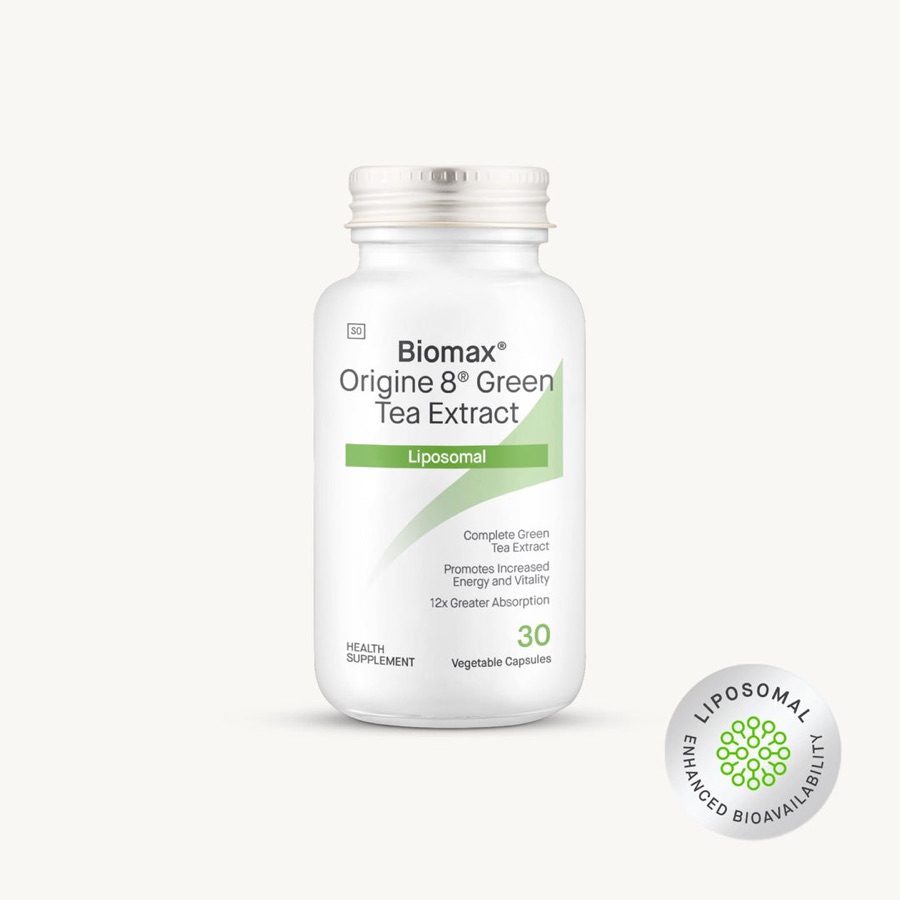
Catalog
Enrichment

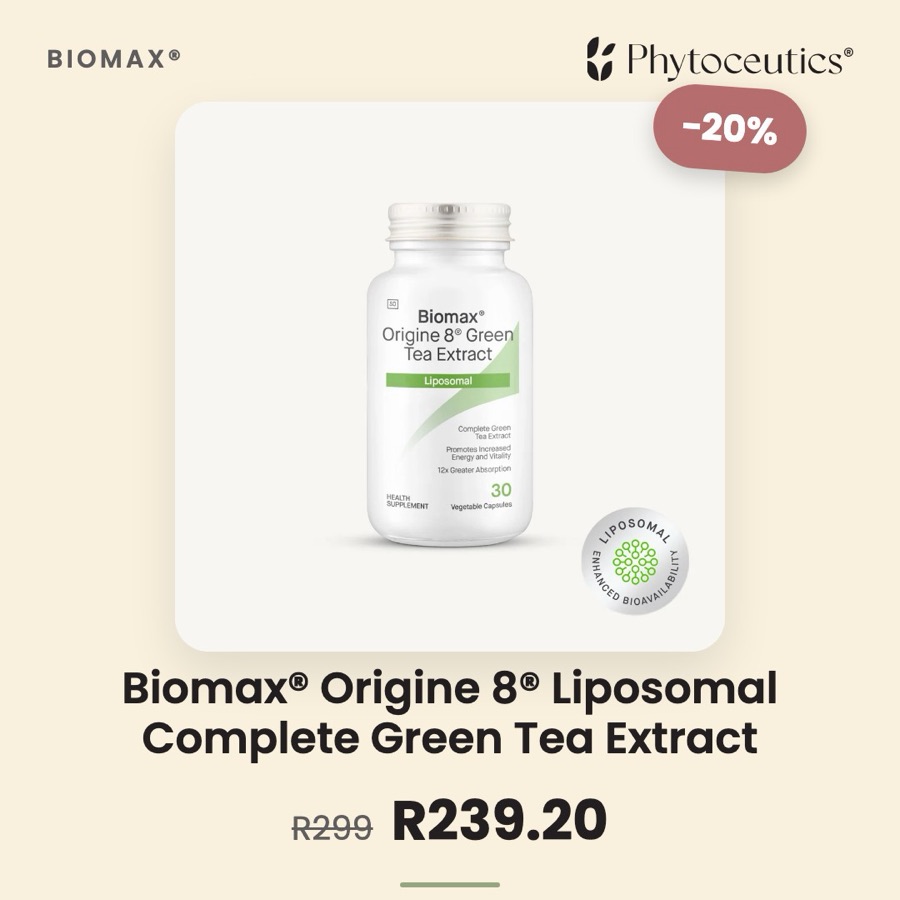
Your product feed, redesigned — automatically. Every SKU in your Meta catalog is re-rendered into a designed template with live pricing, sale strikethroughs and discount badges pulled straight from your store. Catalog ads that look like ad creative, not a spreadsheet row.

Before — Raw Feed
Raw product feed image — bare supplement packshot on white
Every SKU
After — Enriched
Enriched catalog ad — same product rendered in the Phytoceutics brand system with live sale pricing and discount badge

Real example — Phytoceutics, live catalog of 157 SKUs. Sale price, strikethrough and −20% badge rendered from the live product feed, re-synced daily.

🔄

Self-Syncing, Hands-Free

Price drops, new products, stock changes — the enriched feed re-renders what changed and updates daily. No designer, no exports, no maintenance.

🎯

Pixel-Safe By Design

Product IDs and event sources carry over 1:1 — retargeting, dynamic ads and conversion tracking behave identically to your original catalog.

🏷️

Sale-Aware Templates

Products on promotion automatically render with strikethrough pricing and discount badges computed from your live feed — urgency without manual work.

📊

Proven Before Rollout

We A/B your existing catalog against the enriched version before full migration. Industry benchmarks put enriched catalogs at a ~20% performance lift over raw feeds — we verify it on your account first.

Sale Countdown"Sale ends in 3 days" ticks down daily and removes itself when the promo ends.
Low-Stock Urgency"Only 4 left" appears automatically when inventory genuinely runs low.
Sale Templates on a TimerOn-sale products switch to sale creative for the promo window, then revert — zero cleanup.
Product Sets & RulesCategory, sale, or hand-picked segments — each targetable by ad sets, each routable to its own template with a date range.
Review Social ProofReal star ratings, review counts and customer quotes rendered onto the creative.
Two-Image LayoutsLifestyle photography and packshot from your feed, combined in one ad — lifestyle shots auto-detected.
Dynamic ColourEach product's dominant colour sets the ad background — snapped to your brand palette, never off-grid.
Price-Free TemplatesAttribute-chip and editorial layouts for brands that don't lead with price — price is a toggle, not a rule.
Per-Template PerformanceSpend, ROAS and CTR reported per template and per product set — creative decisions on real data.
AI Scene BackdropsBETAOn-brand ambient scenes for products without lifestyle photography — never depicting the product falsely.
BNPL Pricing"4 × R124 with Payflex" instalment chips computed from live prices.
Smart TitlesFeed titles cleaned into ad-ready headlines; the full title stays in the feed for delivery.
Stock-Aware SetsNightly stock classification by sales velocity, days of cover and size availability keeps catalog sets built from what's actually in stock.
Real Scarcity, No Guessing"Only 3 left" and sold-out sizes shown struck through, computed straight from live store inventory; nothing on the ad is invented.
Back-In-Stock CreativeWhen a best seller restocks, it joins a dedicated re-stocked set for seven days with announcement-style creative, then reverts.
Sale-Spend ProtectionDaily monitoring flags ads, sale ads included, whose destination collection has run low on stock, plus alerts when spend lands on dead stock.

The Stock Intelligence
Loop

Catalog ads promote whatever sits in the feed, sold out or not. This is the system underneath that stops it: a loop that reads your store every day, scores every product and rebuilds what the ads are allowed to show before a single impression goes out.

60%
From a live account audit. Of one retailer's 40,784 weekly catalog impressions, 60% were landing on low or sold-out product before this loop switched on. This is what unmonitored catalog spend looks like.
62%
From the same audit. 62% of the ad impressions showed products that didn't sell a single unit that week. The loop moves that spend toward the products that do sell.
RUNS DAILY 1 YOUR STORE 2 CLASSIFY 3 CATALOG SETS 4 FOLLOW STOCK 5 REAL CREATIVE 6 PERFORMANCE
01

Your Store

Stock levels and sales, read from your store every day. Nothing downstream runs on a stale number.

02

Classify

Every product is scored on how fast it's selling, its days of cover (how long the remaining stock will last at that rate) and which sizes are still available.

03

Catalog Sets

The scores sort every product into one of three sets on your Meta catalog: well stocked, running low or freshly re-stocked. Each one rebuilds automatically, with no list to maintain by hand.

04

Ads Follow Stock

Always-on catalog ads draw only from what's actually buyable right now. A fresh restock gets a seven-day spotlight of its own before it folds back into the regular rotation.

05

Creative Tells The Truth

"Only 3 left", sold-out sizes shown struck through, back-in-stock announcements: every scarcity claim on the ad is pulled from live inventory, never written in.

06

Performance Feeds Back

Delivery and click-through are tracked product by product. That's what shows which ones have earned the investment of richer, hand-built creative, and it feeds straight back into what gets classified next.

1

Your Store

Stock levels and sales, read from your store every day. Nothing downstream runs on a stale number.

2

Classify

Every product is scored on how fast it's selling, its days of cover (how long the remaining stock will last at that rate) and which sizes are still available.

3

Catalog Sets

The scores sort every product into one of three sets on your Meta catalog: well stocked, running low or freshly re-stocked. Each one rebuilds automatically, with no list to maintain by hand.

4

Ads Follow Stock

Always-on catalog ads draw only from what's actually buyable right now. A fresh restock gets a seven-day spotlight of its own before it folds back into the regular rotation.

5

Creative Tells The Truth

"Only 3 left", sold-out sizes shown struck through, back-in-stock announcements: every scarcity claim on the ad is pulled from live inventory, never written in.

6

Performance Feeds Back

Delivery and click-through are tracked product by product. That's what shows which ones have earned the investment of richer, hand-built creative, and it feeds straight back into what gets classified next.

The loop closes on itself: what performance uncovers in step six changes what gets classified in step two, tomorrow. This runs again every day, not once at setup.

Protection Layer Daily monitoring runs on top of the loop. Every ad's destination collection is checked, so a product that sells out mid-campaign gets caught before spend keeps landing on a page with nothing to buy. A separate alert fires whenever spend concentrates on stock that isn't moving.

Four Steps To Live

01

Connect

We read your Meta catalog or store feed directly. No replatforming, no plugin, no engineering time on your side.

02

Design

Templates are built in your brand system and stress-tested against your real product data — longest titles, deepest discounts, worst-case photos. You approve the design, once.

03

Generate

Every SKU renders, hosts and publishes into an enriched feed. Image ads batch-generate and stage into your account, paused for sign-off.

04

Sync & Prove

The feed keeps itself current daily while an A/B test reads the lift against your existing catalog. Data decides the rollout.

Connect · Design · Generate · Sync & Prove · Growth by Design · Connect · Design · Generate · Sync & Prove · Growth by Design ·

Your Catalog Is Already
An Ad Account.
Make It Look Like One.

Tell us about your product feed and creative pipeline and we'll show you exactly what we'd build. No generic pitches — a direct conversation about your operation.